
Website care
Small Business Website Redesign: 9 Signs and a Safe Way to Do It
Small business website redesign, done safely: 9 signs your site needs work, and the page-by-page checks that keep your Google rankings through the switch.

A tired website doesn't always need a new look. Often it needs to load faster, say what's true today, and stop costing an hourly fee every time a price changes. A small business website redesign can fix all of that, or it can quietly break the web addresses Google has been sending customers to for years. Below are nine signs your site needs work, which of them really call for a designer, and the checks we run on real rebuilds so the switch doesn't cost you your place in Google.
9 signs your small business website needs a redesign
Your small business website needs a redesign, or at least a rebuild, when it's slow on a phone, hard to change, out of date, insecure or no longer brings in enquiries. Not every sign calls for a new design, so each one below says what kind of fix it points to.
1. It takes more than a few seconds to load on a phone
Google measures this with Largest Contentful Paint (LCP), the time until the biggest image or block of text appears. Its web.dev guidance rates 2.5 seconds or less as good and anything over 4 seconds as poor. The WordPress version of dcreviews.co.za, a site we rebuilt, took 7.0 seconds in a Lighthouse mobile test. After the rebuild it took 1.2. The design didn't change at all, so the code was the problem.
2. It looks cramped or broken on a phone
Google judges the phone version of your site first. In its own mobile-first indexing guidance, it says: "Google uses the mobile version of a site's content, crawled with the smartphone agent, for indexing and ranking." Tiny text, overlapping buttons and menus that won't open are layout problems. That's real design work.
3. Changing a phone number means paying a developer
If every small edit goes through a developer, you pay each time. Glitch, a Cape Town agency, lists R500 an hour for content and design changes on its website in September 2026. A new design won't change that. A better way to update your website without a developer will.
4. The facts on it are out of date
Old prices. Staff who left two years ago. A service you stopped offering. Each one tells a visitor the wrong thing before they've even picked up the phone, and a page-by-page content refresh fixes it without touching the design.
5. The dashboard is full of plugin update warnings
Plugins are the add-ons that give WordPress its extra features, and they're where most of its security holes sit. Patchstack, a WordPress security company, counted 11 334 new vulnerabilities in the WordPress ecosystem in 2025, and 91% of them were in plugins. Its State of WordPress Security in 2026 report also found that 46% had no fix from the developer by the time they were made public. A static site, made of ready-made pages, has no plugins to patch.
6. Visitors arrive but don't get in touch
If people visit and leave without calling, look at your first screen. Does it say what you do and where? Is the phone number one tap away, or buried in the footer? A free website audit shows which of these nine signs apply to your site before you spend anything, covering phone speed, Google visibility, AI visibility and content. If the first screen is the problem, you need design and wording work.
7. It no longer looks like your business
A new logo, a new service line or a move to new premises that the site doesn't show is a genuine design job. Here a designer earns their fee.
8. Google and AI assistants can't read it properly
Open yourdomain.co.za/robots.txt in a browser. Robots.txt is a small text file that tells crawlers which pages they may visit. If it blocks AI crawlers such as OpenAI's GPTBot, Anthropic's ClaudeBot or PerplexityBot, those bots won't read your pages. Missing page titles and pages Google hasn't indexed point the same way: a technical fix, not a visual one.
9. The browser says "Not secure"
Chrome has labelled every plain HTTP page "Not secure" since Chrome 68 came out in July 2018. HTTPS, the encrypted connection that shows a padlock, needs a security certificate on your hosting. It rarely needs a redesign.
How can I redesign my existing website?
You can redesign your existing website safely by listing what already works, keeping every web address (URL) that brings in visits, changing one layer at a time and checking every page before the new version goes live. The layers are the look, the words and the code underneath. Change all three at once and you won't know which one moved your enquiries or your rankings. In practice, though, you'll rarely need to change all three.
Start in Google Search Console, Google's free tool for site owners. It shows which pages get clicks and which searches bring people in. Those pages keep their URLs, and ideally their words. Then brief your designer, or a rebuild service, with that list in hand.
How to redesign a website without losing Google rankings
You keep your Google rankings through a redesign by making sure every old address still loads or permanently redirects, and that each page still says what it said unless you meant to change it. Google's own guide to site moves with URL changes starts in the same place: list the old web addresses (URLs) and decide where each one should go. Here's the checklist we run on every rebuild, and it works for any small business website redesign. The diagram below shows the order.
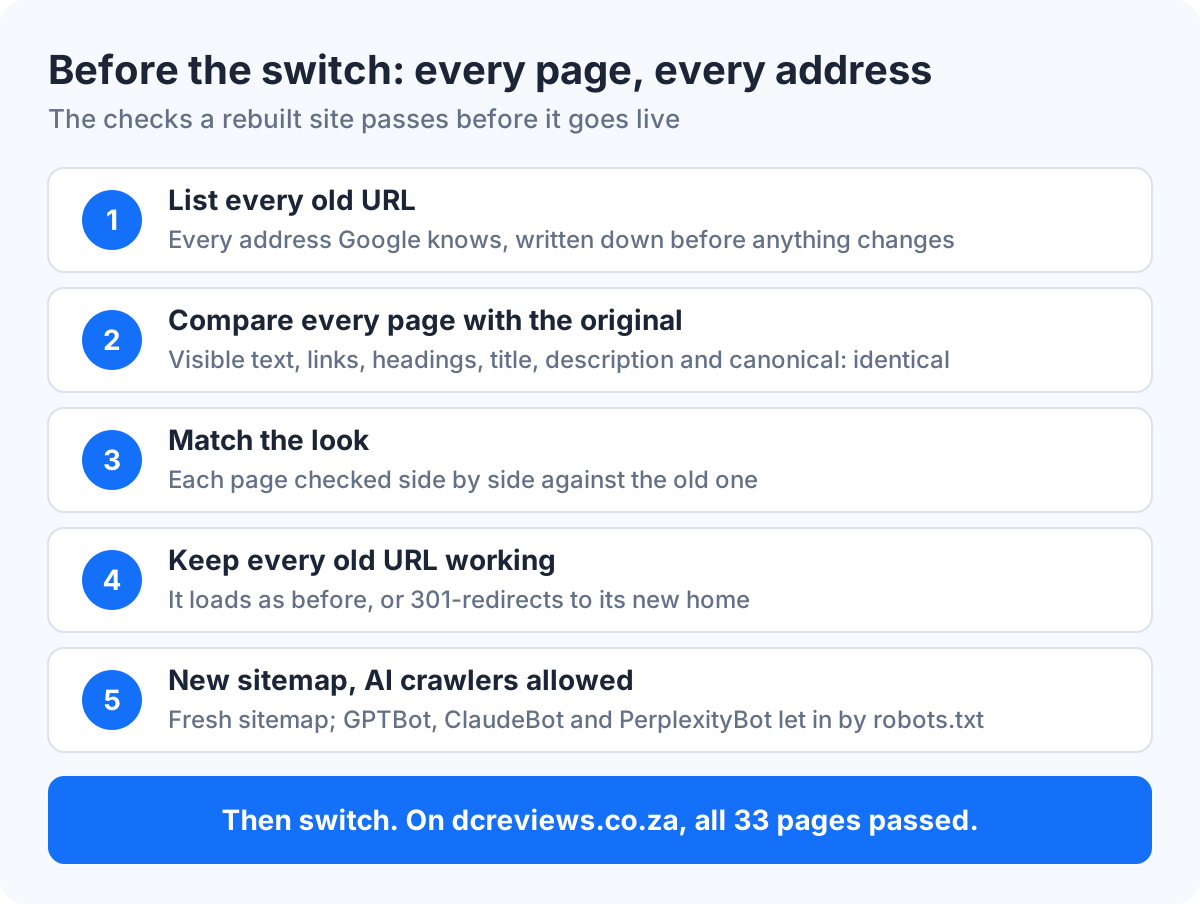
- List every old URL. Write down every address Google knows about before anything changes.
- Compare every page before the switch. On our rebuilds, the visible text, links, headings, page title, meta description (the summary under your link in Google) and canonical tag (the line naming a page's main address) must be identical. The look must match too. On dcreviews.co.za, all 33 pages passed before we switched.
- Make every old URL resolve or redirect. A 301 redirect is a permanent "this page has moved" signal. Google's page on redirects and Google Search explains that a permanent redirect tells it the new address should be the one it shows. Its site-move guide says to keep redirects "generally at least 1 year".
- Regenerate the sitemap. A sitemap is the file that lists every page for search engines. Build a fresh one from the new site so it never points at pages that are gone.
- Allow AI crawlers in robots.txt. On the sites we rebuild, GPTBot, ClaudeBot, PerplexityBot and others are allowed in, so AI assistants can read the pages.
Know what's wrong before you redesign
A person reads your site's speed, Google visibility, AI visibility and content, then names the three problems that matter most.
Check my site firstWhat should you check after the new site goes live?
After the new site goes live, submit the fresh sitemap in Google Search Console, test your old addresses and your forms, and watch clicks and enquiries for a few weeks. Google's site-move guidance is plain about the wobble: visibility "may fluctuate temporarily during the move", and "a site's rankings will settle down over time".
A short list for the first week:
- Open 10 of your most-visited old addresses and confirm each one loads or redirects.
- Send a test message through every contact form.
- Keep your analytics running, so you can compare before and after on the same numbers. On our rebuilds, analytics stays in place and loads after the page.
- Check the page titles Google shows for your main pages. They should read the same as before, unless you changed them on purpose.
Should you redesign or rebuild your small business website?
Rebuild if your site looks right but is slow, insecure or hard to change; redesign if the look, the layout or the brand is wrong. Slow pages, plugin warnings, blocked crawlers and costly small edits are problems in the code under the site. A dated look, a confusing first screen or an old logo need a designer.
The price gap is wide. Viewport, a South African agency, says most small-to-medium business redesigns cost R15 000 to R60 000, as listed on its website in September 2026. Our breakdown of website redesign prices in South Africa has the full table. A same-look WordPress rebuild from Send to Site costs R1 500 a month for the first six months, then R750 a month, with hosting and changes by email included. It doesn't suit WooCommerce shops, membership sites, online courses or booking systems, which need a server.
That said, the two aren't a lifetime choice. You can rebuild now and bring in a designer later. For brand new builds, see our guide to website design cost in South Africa.
What are the five golden rules of a website?
There's no official list, but the five rules we'd hold any small business site to are: load fast, say what you do, make contact easy, stay current, and be readable by machines.
- Load fast on a phone. Aim for the main content in 2.5 seconds or less, Google's "good" mark for Largest Contentful Paint (LCP).
- Say what you do, and where, in the first screen. A visitor should know at a glance if you're the right business.
- Make contact one tap away. Put a phone number or WhatsApp link near the top, not at the end of a hunt through the footer.
- Stay current. If a price change needs a developer, the site will drift out of date.
- Be readable by Google and AI assistants. Clear page titles, working links and a robots.txt file that lets crawlers in.
See which of the nine signs apply
Get a free two-page report on your website, with a 20-minute walkthrough and nothing to sign.
Get my free website auditChange your website by sending an email
We rebuild your WordPress site to load fast, then you email changes and approve every one before it goes live. R1 500 a month for the first 6 months, then R750 a month.