
Speed
Static Website vs WordPress: Real Numbers for a Small Business
A static website loaded in 1.2 s where the WordPress version took 7.0 s. What changes for the owner, what hosting costs, and when WordPress still wins.

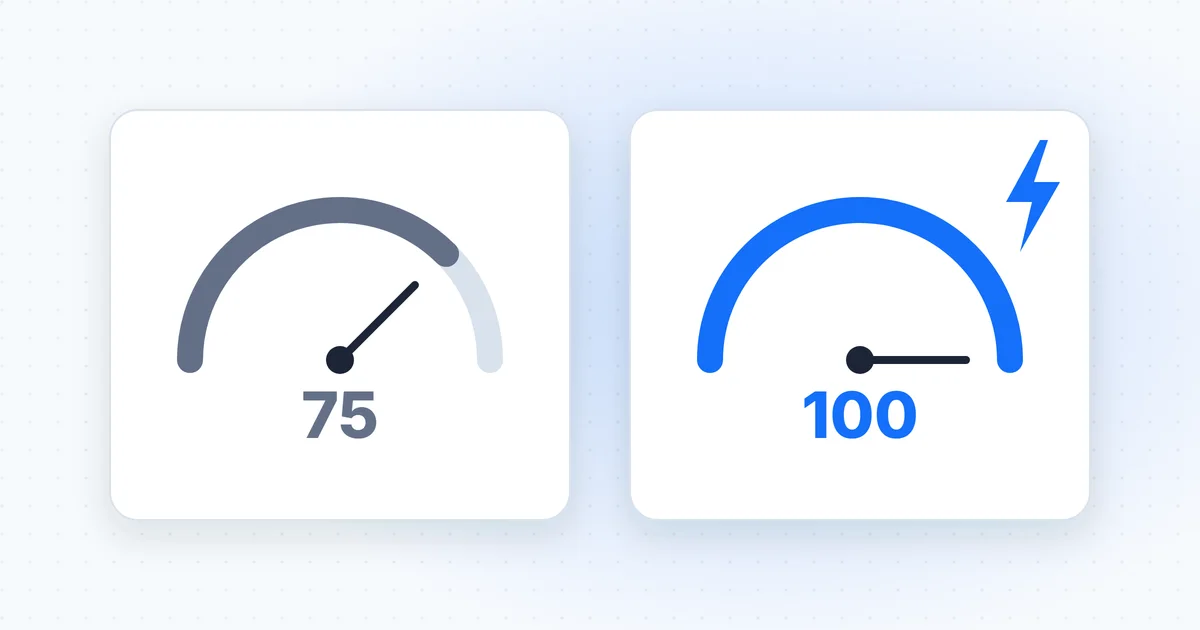
On WordPress, the home page of dcreviews.co.za took 7.0 seconds to show its main content in Google's mobile speed test. Rebuilt as a static website, the same page took 1.2 seconds. Same words, same look, same web address. So where did almost six seconds go, and what did the owner give up to get them back?
What is a static website?
A static website is a set of finished pages stored as files, which the server hands to every visitor exactly as they are. Each page is built once, ahead of time, whenever the content changes. When someone visits, nothing gets assembled. No code runs on the server and no database is queried. The server just sends the file.
The files are ordinary web files. HTML is the code that holds a page's words and structure. Cascading style sheets (CSS) handle the look. Images are images. A tool called a static site generator turns your content into those files. Send to Site uses one called Astro and hosts the result on Cloudflare Pages.
"Static" describes how pages are delivered, not how the site behaves. A static site can still have a working contact form, visitor analytics and a blog that grows every month. It can change as often as you like. Each change simply means rebuilding the pages before they go live.
Static website vs dynamic website: what's the difference?
A dynamic website builds each page on the server at the moment someone asks for it, while a static site builds its pages in advance and simply sends them. WordPress works this way. Without caching, every visit runs PHP, the programming language WordPress is written in, which pulls the content out of a MySQL or MariaDB database and stitches it into a template. Caching plugins can keep ready-made copies to save work, but the machinery still sits behind them.
| Static site | WordPress | |
|---|---|---|
| How a page is made | Built in advance, sent as a file | Put together on the server for each visit, or served from a cache |
| What runs on the server | File delivery only | PHP code and a database |
| Login page | None on the public site | A public login page by default |
| Plugins to update | None | Every installed plugin and theme |
| Hosting | Free plans exist for static files | Needs hosting that runs PHP and a database |
| How changes happen | Content is edited, then the pages are rebuilt | Log in to the dashboard and edit |
| Good fit | Brochure sites, service businesses, blogs | Shops, memberships, courses, bookings, many daily editors |
A typical small business site has a home page, services, an about page, a contact form and a blog. Almost none of that needs a server to think. If yours is a brochure site on WordPress, a static rebuild that keeps your look and web addresses is the first thing we'd look at.
Our before and after numbers from a real rebuild
When Raimond, the company behind Send to Site, rebuilt dcreviews.co.za from WordPress as a static site, the home page's mobile Lighthouse performance score rose from 75 to 100. Lighthouse is Google's free page-testing tool, and these are lab tests: controlled runs, not data from real visitors. The site reviews debt counsellors, and Raimond still runs it. The chart below shows all four numbers we tracked.
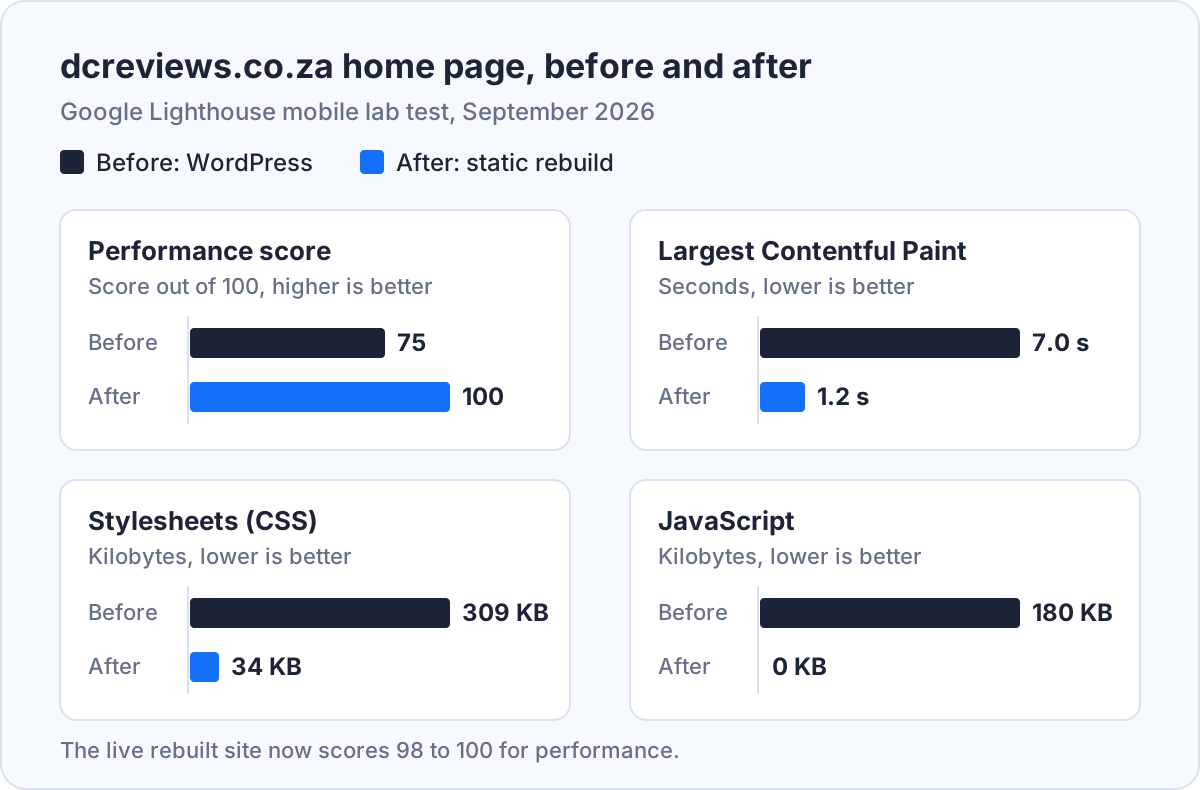
Largest Contentful Paint (LCP) is the time until the biggest block of text or image on screen has appeared. Google's guidance on Largest Contentful Paint at web.dev calls 2.5 seconds or less good and anything over 4.0 seconds poor. So the page moved from poor to comfortably good.
Most of the gain came from what was no longer there. The WordPress version loaded 309 kilobytes (KB) of stylesheets and 180 KB of JavaScript, the code that makes pages interactive. The static version loads 34 KB of CSS and no JavaScript at all.
The content didn't move an inch. Before the switch, all 33 pages were checked against the originals: the visible text, links, headings, title, description and canonical tag (the tag that tells Google a page's main address) had to be identical, and the look had to match. All 33 passed. The live site now scores 98 to 100 for performance and 100 for search engine optimisation (SEO) in Lighthouse.
What is the downside of using WordPress?
The main downside of WordPress is upkeep: every plugin and theme is software someone has to keep updated, and plugins are where most security holes turn up. Patchstack's State of WordPress Security in 2026 report counted 11 334 new vulnerabilities in the WordPress ecosystem during 2025, 42% more than the year before. Plugins accounted for 91% of them and themes for 9%, while WordPress core had just six. And 46% weren't fixed by the time they were made public.
A vulnerability is a flaw an attacker can use. A fixed plugin only protects you once somebody installs the update, on every site, every time. That routine is a large part of what WordPress care plans charge for each month.
Speed is the second cost. Themes, page builders and plugins each bring their own stylesheets and scripts. That's how a debt counsellor review site ended up loading 309 KB of CSS on its home page.
What changes for the owner after moving to a static website?
After moving to a static website, the owner has no plugins to update and no login page to guard, and changes go through whoever runs the build instead of a dashboard. With Send to Site, you email changes@sendtosite.com in plain words, attaching photos, PDFs or Word documents if you need to. An acknowledgement arrives within a minute. If something is unclear, you get at most three questions, all in one email.
The change is made on a copy of the site. Automated checks build and test it, and a separate read-only reviewer confirms it does only what you asked. Then you get a preview link with two buttons: "Publish this change" and "Cancel this change". Nothing goes live until you tap Publish. Every change is kept in version history, so an undo is a reply to the email.
How fast is it? On our pilot site, a text change went from email to live in 3 minutes 57 seconds on 22 September 2026. Small changes typically reach the preview in about 95 to 100 seconds, while bigger layout changes can take 8 to 12 minutes.
In practice, though, you do give something up: the late-night tinker. You can't log in and nudge a heading yourself, and only one change is open at a time. Our guide to updating a website without a developer covers how that plays out week to week.
Keep your look, lose the plugins
We rebuild your WordPress site as a static site with the same words and web addresses.
Make my site staticCan I host a static website for free?
Yes, you can host a static website for free: Cloudflare Pages, for one, doesn't charge for serving static files. The Cloudflare Pages pricing documentation says requests to static assets are free and unlimited on both free and paid plans. Cloudflare's free plan also allows 500 builds a month and up to 20 000 files per site, which is plenty for a small business.
Free hosting isn't a free website, though. You still pay for your domain name every year. Someone still has to build the site, keep the build working and make the changes, and that's where the real cost sits. Send to Site includes hosting in its monthly fee of R1 500 for the first six months, then R750, and your domain and email stay where they are. For everything else that goes into the budget, our guide to website design cost in South Africa sets out the rand figures.
Is WordPress outdated in 2026?
No, WordPress isn't outdated in 2026: it runs 40.2% of all websites, according to W3Techs' survey of WordPress usage for September 2026. Among sites whose content management system (CMS) W3Techs can identify, its share is 58.7%. WordPress is still actively developed, too, and its own requirements page now recommends running it on PHP 8.3 or newer.
Here's the thing. Age isn't the problem. Fit is. WordPress is a publishing platform with a database, a plugin system, user accounts and a login page. A five-page site for a plumber in Pretoria uses almost none of that, yet carries all of it, updates included.
When is WordPress still the right choice?
WordPress is still the right choice when your site has to do real work on a server: selling products, running member logins, hosting courses, taking bookings, or letting many staff publish every day. A WooCommerce shop needs a cart, stock levels and a checkout. A membership site needs accounts. A booking system needs a live calendar. None of those can be built in advance, and Send to Site turns these sites away for exactly that reason.
That said, a busy newsroom-style site suits WordPress too. If several people publish often and like working in the dashboard, keep it and look after it properly: fewer plugins, prompt updates and decent hosting.
The rest are brochure sites that change a few times a month. They're paying, in updates and in speed, for machinery they never use.
See what a static rebuild would change
Same pages, same addresses, no login page to guard, and changes by email from day one.
See my rebuild optionsChange your website by sending an email
We rebuild your WordPress site to load fast, then you email changes and approve every one before it goes live. R1 500 a month for the first 6 months, then R750 a month.