
Website care
Website Updates Without a Developer: 4 Ways That Work
Four ways to handle website updates without a developer, with real rand prices, and the email route that went from inbox to live in 3 min 57 s.


Old trading hours. Last year's price list. A team photo with someone who left in March. Website updates like these take five minutes to describe, yet they tend to wait, because each one needs a login you've forgotten, a developer's free afternoon or an invoice. Here are the four ways to get them done without hiring a developer, with the rand prices South African providers publish, including one route that most how-to guides don't mention at all.
How do I update my website?
You update your website without a developer in one of four ways: edit it yourself in the platform's editor, pay someone per change, keep an agency on a retainer, or email the change to a service that builds it and waits for your approval. The right one depends on how often you need website updates and how comfortable you are in an editor. The table compares all four on price, speed and the catch.
| Option | What you do | Typical cost in South Africa | Time to live | The catch |
|---|---|---|---|---|
| 1. Do it yourself in WordPress or Wix | Log in, edit, press Update or Publish | No extra fee beyond your plan | As soon as you finish | Your time, your mistakes, and on WordPress the plugin updates |
| 2. Pay per change, or a small hourly plan | Email a developer | From R500 a change, or R185 to R699 a month for 1 to 3 hours | Depends on the developer's diary | Billed by the hour; unused time may not roll over |
| 3. Agency retainer | Send a request to your account manager | R990 to R6 790 a month for 2 to 15 hours | Depends on the agency's queue | The fee arrives every month, busy or quiet |
| 4. Email a change service (Send to Site) | Email the change, tap Publish on a preview | R1 500 a month for 6 months, then R750 (VAT included); no limit on changes | 3 min 57 s on our pilot site | Only for sites it has rebuilt; no redesigns, trackers or domain settings |
Prices in options 2 and 3 are as each provider listed them on its website in September 2026.
Option 1: do it yourself in the WordPress or Wix editor
Doing it yourself costs nothing extra, because the editor comes with the WordPress or Wix plan you already pay for. On Wix you open the editor, change the text or swap the image, and press Publish. On WordPress you log in to the dashboard, open the page in the block editor and press Update. For a phone number or a price, that's a five-minute job.
Here's the thing. The edit is easy. The admin around it isn't.
WordPress expects you to keep its software current as well as your content. WordPress's own guide to updating tells you to back up the site before you start and to always run the latest version. Plugins, the add-ons that give WordPress extra features, are the weak spot: Patchstack's State of WordPress Security in 2026 report counted 11 334 new vulnerabilities in the WordPress ecosystem in 2025, and 91% of them were in plugins. Log in after a year away and there's usually a password reset and a stack of update notices waiting before you can touch the page.
Wix runs the software for you, so there's nothing to patch. You only need to be comfortable in its editor.
Best for owners who change something every week and enjoy doing it. If the login is the part you keep putting off, changing your site by email removes it completely, and option 4 below shows each step.
Option 2: pay a developer per change or for a small block of hours
Paying a developer per change costs from about R500 a change in South Africa, and small monthly plans with 1 to 3 hours of work run from R185 to R699, going by the prices providers publish. As listed on each provider's website in September 2026:
- Hikari Labs charges from R500 for text, image or layout changes, on top of an R80 hosting plan that includes up to 30 minutes of minor updates a month.
- Glitch bills edits at R500 an hour on its Basic and Standard plans.
- Parallax Studios sells 1 hour a month for R185.
- Webluno sells 1 hour for R399 or 3 hours for R699, with hosting included and no contract.
- Webdo charges R450 a month for software updates plus up to 30 minutes of small content changes.
Time is the unit you're buying. A clear request costs less than a vague one, and two rounds of "not quite" cost double. Webdo states that unused time doesn't roll over, and Zoeke's R390 plan for an hour of changes needs a three-month minimum. In practice, though, the bigger cost is waiting. Speed depends on their diary, not yours.
Best for owners who change something every month or two and already have a developer they trust.
Option 3: keep an agency on a monthly retainer
An agency retainer buys a set number of hours every month, and published South African retainers run from R990 for 2 hours to R6 790 for 15 hours. Those two figures are Digital Consulting's, as listed on its website in September 2026, and it lets unused hours carry over for up to 4 months. Engage24 lists R1 410 a month for up to an hour of changes and R3 160 for up to three hours, both excluding value-added tax (VAT).
What you get is a person who knows your site and can take on bigger jobs, such as a new landing page or a seasonal campaign section. What you give up is flexibility. Quiet month? Same invoice.
If you're weighing retainers against simpler plans, our breakdown of what website maintenance costs lists more South African packages side by side.
Best for businesses that change the site weekly and have a marketing plan behind the changes.
Option 4: email the change and approve a preview
The fourth option is to email the change in plain words to a service that makes it on a copy of your site, tests it and sends you a preview to approve before anything goes live. Send to Site works this way on every site it has rebuilt. Here's exactly what happens:
- You email changes@sendtosite.com in plain words. Attach photos, PDFs or Word documents if the change needs them.
- An acknowledgement arrives within a minute.
- If something is unclear, you get at most three questions, all in one email.
- The change is made on a copy of your site, never the live one, and automated checks build and test it.
- A separate reviewer, which can read the change but not edit it, checks that it does only what you asked.
- You get a preview link with two buttons: "Publish this change" and "Cancel this change". Reply to the email if you want it tweaked.
- Nothing goes live until you tap Publish. Every change is saved in version history (git, the record developers use to track each edit), so an undo is simply a reply to the email.
On our pilot site, a text change went from email to live in 3 min 57 s on 22 September 2026. In testing, small changes reached the preview in about 95 to 100 seconds. Bigger layout or stylesheet changes (the stylesheet controls colours, fonts and spacing) can take 8 to 12 minutes. The diagram below shows where the time goes.
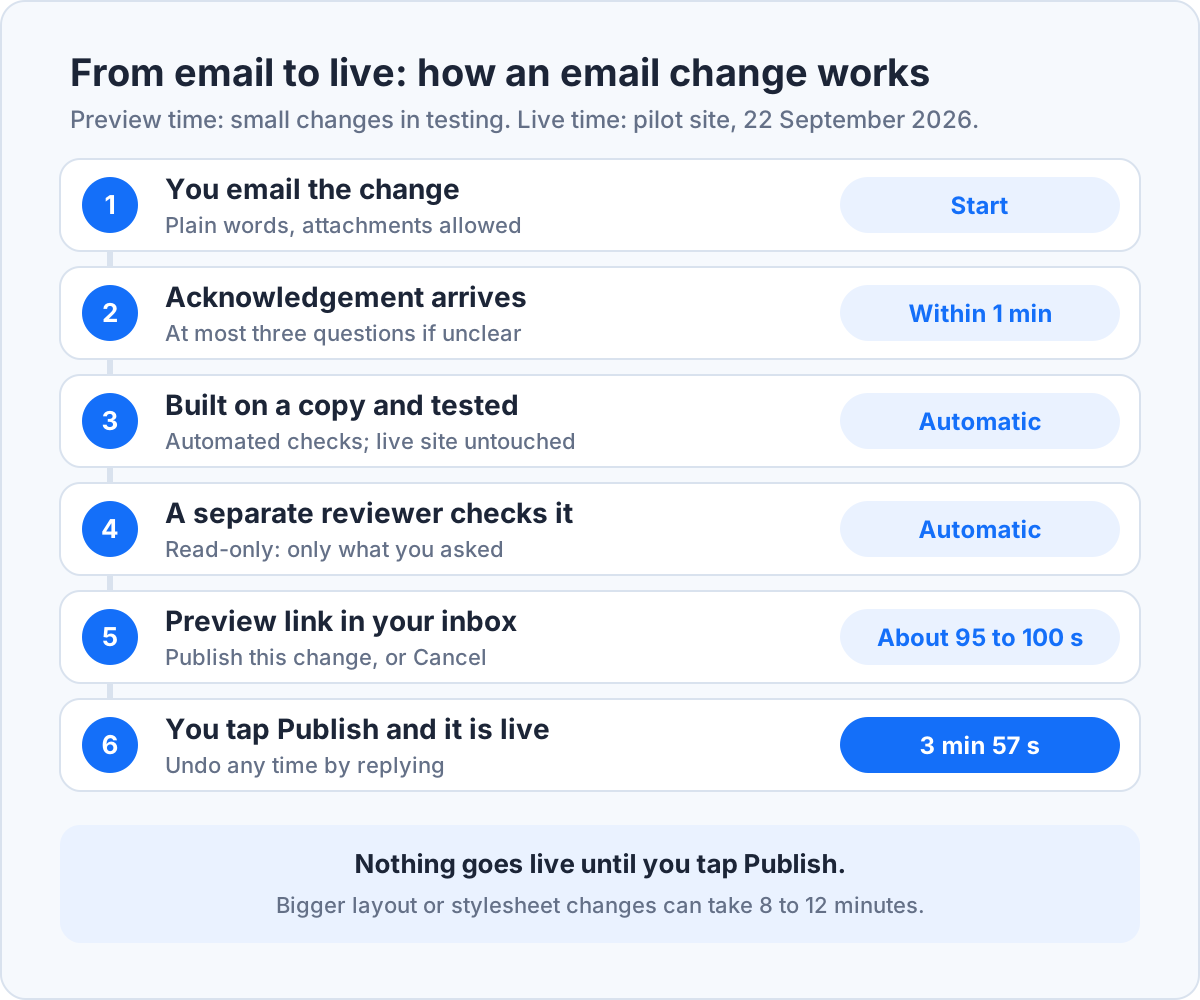
One change is open per site at a time. Send a second request before you've published the first, and it folds into the same preview.
So what does a good request look like? Something like this:
Subject: Saturday hours and a new shop photo
Hi, please change our Saturday hours on the contact page to 08:00 to 14:00. And swap the shopfront photo on the home page for the one attached.
Thanks, Lerato
Plain words are enough.
Change your website with one email
Write the change in plain words, check the preview, tap Publish. Nothing goes live before that.
Update my site by emailWhat email changes can't do
Email changes can't redesign your whole site, add tracking or third-party scripts, delete whole pages, or reach anything outside the website's own files. That last group covers your domain, your email, hosting accounts, social media accounts, payments and bookings. A full redesign is a design project, not a change.
Scripts are refused on purpose. A tracker or embed is code someone else wrote, running on every page, and a change service shouldn't be adding that on the strength of one email. If a request falls outside what the system can do, a person replies within one business day.
The email route also depends on the kind of site. Send to Site rebuilds WordPress sites as static sites, meaning ready-built pages with no database or login behind them. That's why it declines WooCommerce shops, membership sites, online courses and booking systems: all four need a server running in the background.
How much does it cost to have a website updated?
Having a website updated in South Africa costs nothing if you do it yourself, from about R500 for a single change by a developer, and R990 to R6 790 a month for an agency retainer, based on prices providers published in September 2026.
Over a year the gaps get clearer. Webluno's R399 plan comes to R4 788 for an hour a month. Digital Consulting's 2-hour plan comes to R11 880. Send to Site costs R13 500 in the first year, which covers rebuilding the site, and R9 000 a year after that, with hosting included and changes not billed by the hour.
That said, if you change one thing a quarter, a pay-per-change developer is cheaper, and you should use one. The flat fee starts to pay off when changes are frequent, or when each round of hourly back-and-forth adds to the bill.
Updates are only one line in the budget. For build, hosting and running costs together, see our guide to website design cost in South Africa.
What should you do after a website update goes live?
After a website update goes live, check the page on your phone, copy any changed details to your Google Business Profile, and ask Google to recrawl the page if the change matters for search.
Trading hours are the classic miss. Your website says one thing, your Google listing says another, and the customer who drives over on a Saturday finds out which was wrong. Google's help page on editing your Business Profile covers both regular and special hours.
Search results catch up on their own schedule. According to Google's guide to asking for a recrawl, crawling can take anywhere from a few days to a few weeks, and requesting the same page again won't speed it up. Use the URL Inspection tool in Search Console, Google's free dashboard for site owners, once per changed page. Then leave it alone.
See a change go live in minutes
Send to Site rebuilds your WordPress site exactly as it is, then every update is an email and a Publish tap.
Show me how it worksChange your website by sending an email
We rebuild your WordPress site to load fast, then you email changes and approve every one before it goes live. R1 500 a month for the first 6 months, then R750 a month.